HOW To Search By Date in Windows XP
1) Goto the start menu and select Search

2) If you are looking for a word document excel or a picture you can select Pictures and Music. In this example we will assume you want to search all the files on your computer. So click on All Files and Folders

4) Now you must select where you want to search to search your entire computer and all drives select “My Computer” from the “Look in:” drop down.
Note: this can be quite time cosuming if you know exactly where you want to look you are better off selecting the drive or folder form the drop down or by going to “Brose”

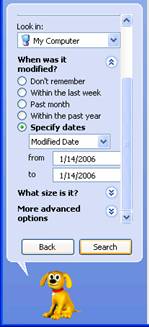
5) Now Select the When was it modified drop down box.
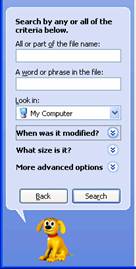
6) Now by going to “Specify dates” you can choose the dates you want to search between or you can choose one of the other options

7) Select Search and your computer should find whatever file you are looking for.
Need more help email help@conage.com and remember we are add sponsored so take the time to read our sponsors adds and see if there is anything you are interested in clicking on.